
How I finally "got it together"
“"By failing to prepare, you are preparing to fail." -- Benjamin Franklin”
I used to feel like I wasn’t making progress toward the life I wanted.
New Year’s resolutions didn’t help because, honestly, I forgot my goal by the end of the year.
Three-month goals felt better since I could have a better guess of what might happen with my money, health, relationships, or business.
But I didn’t have a reliable system to create traction.
So it was easy for things to slip through the cracks.
Until I created my own.
And the funny thing is, when I consistently planned my week, I began to string together days and weeks of wins.
And when I was inconsistent and didn’t do this, well, things didn’t go according to … plan.
Anyways.
This is how I plan to win my week on Sunday nights or Monday mornings: MDCPS
- Mind Dump → Categorize → Prioritize → Schedule
Mind Dump
Write down everything you have to do.
And I mean everything.
No matter how big or small.
Put it all on paper.
Physically writing will help you remember more things.
Categorize (8Fs)
Once I write everything down, I sort tasks based on their values.
For example, I place each task into one of these eight buckets:
- Faith
- Family
- Future
- Finance
- Fitness
- Fun
- Fleas
- Frogs
(Obviously, feel free to replace categories that best represent your values, but those are the ones that work for me.)
Faith — spiritual disciplines like getting in the Word, going to Church, prayer, etc.
Family — anniversaries, birthdays, undivided attention, etc.
Future — the side-hustle you’re turning into your main hustle, dedicated time for learning, future-building, etc.
Finance — your 9-5, budgeting, debt management, etc.
Fitness — everything mentally, physically, emotionally.
Fun — whether that’s designated outings, or regular decompression, you gotta have some fun.
Fleas — to-do’s you’ll never really get rid of (haircuts, dry cleaners, chores, etc.). They might be annoying or pesky, but they’re not critical.
Frogs — you know these need to be taken care of, but you’re avoiding them (typically big, annoying, or uncomfortable tasks or conversations). These could be dealing with debt, family drama, or fixing car issues — ultimately you’ve got to “eat the frog”.
Prioritize
Now we’re going to properly rank tasks within your values.
You might be familiar with the Eisenhower Matrix, if not, here it is:
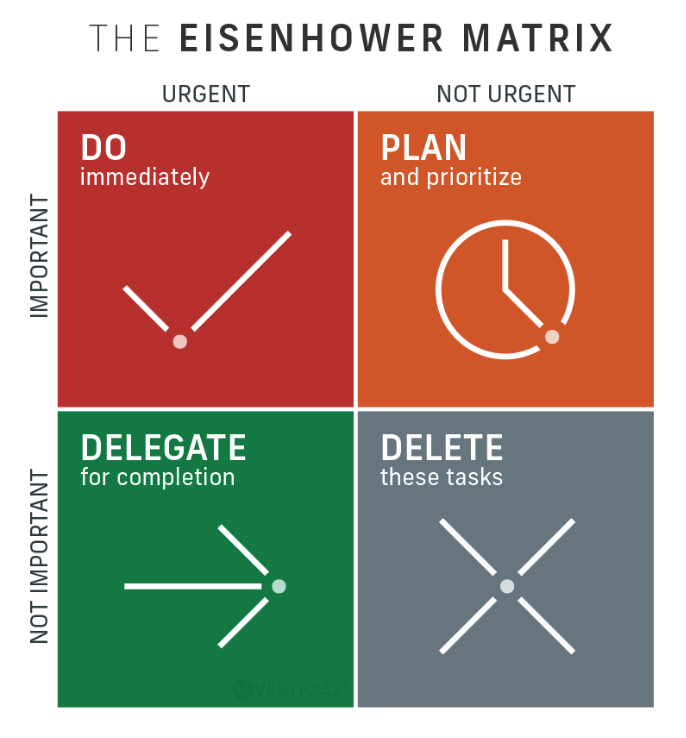
Here’s how you use it to have a place for every fire:
- Create an Eisenhower Matrix for each value (one for each of the 8F’s).
- Place each task into one of the following boxes within the Eisenhower Matrix, based on the following parameters:
- NOW — urgent and important
- PLAN — important, but not urgent
- DELEGATE — urgent, but not important
- DROP — not important, and not urgent
Schedule
Now that every task has is properly prioritized, use your calendar.
I prefer my computer’s calendar, but do what works best for you.
- For “NOW’s” — schedule your next available 30 minute block to start crossing off those tasks (or take the first step) in order of your values (8F’s).
- For “PLAN’s” — PLAN a spot in your calendar to dedicate time for deep work in order of your values (8F’s).
- For “DELEGATE’s” — find ways to have software or services do these tasks for you. (As a rule of thumb, if the task costs less than your hourly wage, delegate it. Get your time back.)
- For “DROP’s” — do the very scary thing of letting those fires burn. I know, it can be tempting to think “well if it doesn’t involve me, and it’s not important, and it’s not urgent … when will it get done?” — The answer is: later. Or, maybe even not at all. But that’s fine because, believe it or not, life will go on.
Woah, that was a lot.
The good news is, instead of repeating this process for every single task, every single week, set up recurring events (gym, haircut, commute, etc.) in your computer calendar so you don’t have to do the mental exercise again and again.
The goal is to set as many repeating tasks on auto-pilot as possible.
Doing this once a week will help you shape a typical schedule and save brainpower by not “re-planning” the same tasks.
Oh, and speaking of brain power, one last thing …
As other tasks come up, it helps to have one place to reference them later when you do your MDCPS for the week.
I use Apple’s reminder app and set a date and time to when I’ll be doing my MDCPS.
This system helped me do things consistently and gain real traction.
I hope it helps you too.
— And, if you’re looking for the next book in your reading routine, head over to readar.ai to find the right book to read next.
Keep seeking,
Michael

PS Meme — weeks are like appetites …